
Your website may attract visitors every day, but are those visitors becoming customers? Many businesses invest time and money in SEO, social media, and online advertising, yet struggle to get enough enquiries. The problem may not be website traffic. It may be the way the website guides visitors toward taking action.
To convert website visitors into leads, you need a clear message, strong calls to action, useful landing pages, trust signals, and simple contact forms. These five practical tips can help you turn more visitors into potential customers without always spending more money on advertising.
In this guide, SakthiDigital explains how to improve your website experience, encourage enquiries, and build a better lead generation strategy for your business.
What Does It Mean to Convert Website Visitors Into Leads?
Converting website visitors into leads means encouraging people who visit your website to share their contact details or express interest in your products or services.
For example, a visitor might fill out a contact form, request a quote, book a consultation, download a useful guide, or contact your business through WhatsApp.
A website lead is not always a paying customer. It is someone who has shown interest and given you an opportunity to continue the conversation.
The goal is to make it easy for the right visitors to understand your offer and take the next step.
Why Do Website Visitors Leave Without Contacting You?
Before improving your website, you need to understand why people leave without making an enquiry.
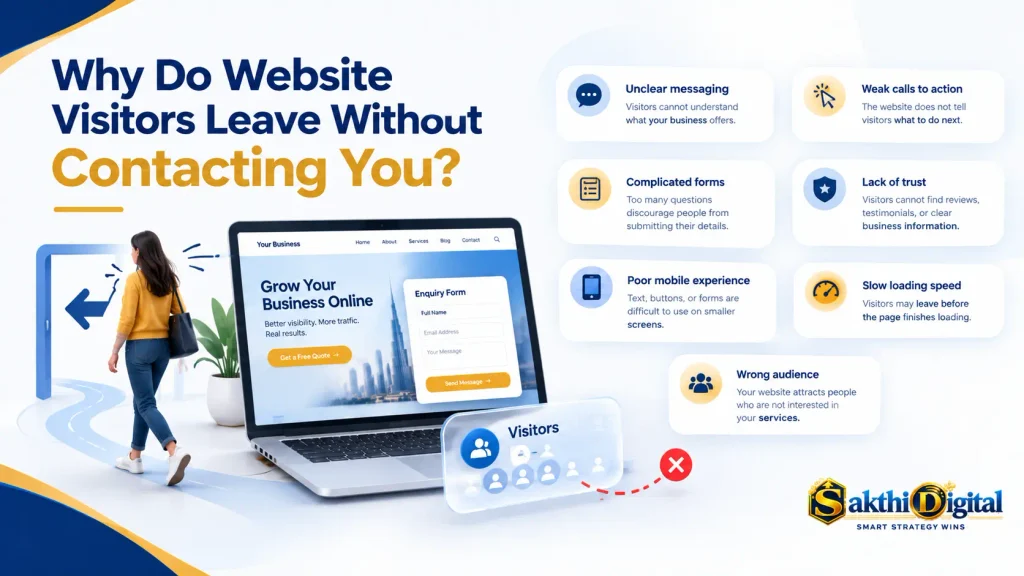
Here are some common reasons:
- Unclear messaging: Visitors cannot understand what your business offers.
- Weak calls to action: The website does not tell visitors what to do next.
- Complicated forms: Too many questions discourage people from submitting their details.
- Lack of trust: Visitors cannot find reviews, testimonials, or clear business information.
- Poor mobile experience: Text, buttons, or forms are difficult to use on smaller screens.
- Slow loading speed: Visitors may leave before the page finishes loading.
- Wrong audience: Your website attracts people who are not interested in your services.
Understanding these problems helps you focus on improvements that can make a real difference.
Tip 1: Create Clear Headlines That Explain Your Value
Your headline is one of the first things visitors notice when they arrive on your website. It should tell them what you offer, who you help, and why your service matters.
A confusing headline can make visitors leave because they cannot quickly understand whether your business meets their needs.
Write a headline that answers the visitor’s question
Imagine a small business owner visits a digital marketing website. The headline says, “Welcome to Our Digital World.”
This sounds general and does not explain the value of the service.
A stronger headline would be:
“Grow Your Business With Practical Digital Marketing Services.”
This headline explains the benefit more clearly.
For a service business, you can use a simple structure:
Get [desired result] with [your product or service].
For example:
• Get More Customer Enquiries With Better Website Design.
• Improve Your Search Visibility With Practical SEO Services.
• Find the Right Customers With Targeted Digital Marketing.
• Simplify Your Business Finances With Professional Accounting Services.
Your headline should reflect what you can genuinely deliver. Avoid promises that you cannot prove, such as guaranteed rankings or guaranteed sales.
Add a supporting sentence
Your headline should be followed by a short explanation of your service.
For example:
“Improve your online presence with SEO, website optimization, and lead generation strategies designed around your business goals.”
This helps visitors understand how you can help them.
Make your main offer easy to find
Place your main headline and call to action near the top of the page. Visitors should not need to scroll through several sections to discover what you offer.
Use simple language, short paragraphs, and readable text. Explain the benefits before listing technical features.
When visitors understand your value quickly, they have a clearer reason to explore your services or contact your business.
Tip 2: Use Strong Calls to Action
A call to action, commonly called a CTA, tells visitors what to do next.
Without a clear CTA, visitors may read your content, browse your services, and leave without taking action.
If you want to convert website visitors into leads, give them a clear and relevant next step.
Choose action-focused CTA text
Generic buttons such as “Click Here” do not explain what happens next.
Instead, use text that communicates the action or benefit.
Examples include:
• Get a Free Consultation
• Request a Quote
• Book an Appointment
• Download the Guide
• Talk to Our Team
• Request a Website Audit
• Contact Us on WhatsApp
Choose a CTA that matches your service and what you can actually provide. If you advertise a free consultation, make sure it is genuinely free and explain what the visitor will receive.
Place CTAs in useful locations
Your primary CTA should be visible near the top of the page. You can also include relevant CTAs after explaining your services, showing customer testimonials, or answering common questions.
For example, a visitor reading about your SEO services may be more likely to request an audit after understanding the problems you can solve.
Avoid placing too many competing buttons on the same page. If every section asks visitors to do something different, they may struggle to decide.
Choose one primary action and use secondary actions only when they support the visitor’s journey.
Make your CTA easy to use on mobile
Many people browse websites using their phones. Your buttons should be large enough to tap comfortably, clearly labelled, and separated from nearby links.
If your business uses WhatsApp for enquiries, provide a working WhatsApp link and make sure it opens the correct conversation.
Test every button on desktop and mobile devices. A button that looks attractive but does not work can cost you potential leads.
Tip 3: Build Landing Pages That Match Visitor Intent
A landing page is a web page designed around a specific goal, such as collecting enquiries, promoting a service, or encouraging bookings.
Sending every visitor to your homepage is not always the best approach. People who click an advertisement for website design should land on a page that explains your website design service, not a page that covers every service you offer.
Match your page to the visitor’s needs
Your landing page should connect the visitor’s original interest with a clear solution.
For example, if someone searches for SEO services, your page could include:
• A clear headline about SEO services.
• An explanation of the SEO problems you solve.
• Your process and deliverables.
• Relevant examples or case studies.
• Answers to common questions.
• A clear enquiry form or consultation button.
This structure helps visitors understand your offer without searching through unrelated information.
Keep the page simple and focused
A useful landing page does not need dozens of sections. It needs enough information to answer the visitor’s main questions and encourage an appropriate action.
Use descriptive headings, short paragraphs, and helpful visuals. Remove unnecessary distractions that take attention away from your main offer.
Make sure the page works well on mobile and loads efficiently. Compress oversized images, avoid unnecessary scripts, and check that the layout does not shift unexpectedly while loading.
Make forms simple
Your contact form should ask only for the information you need at the first stage.
For many service businesses, a name, email address or phone number, and a short description of the requirement may be enough.
If you ask visitors to complete a long form before they understand the value of your service, some may abandon it.
Explain what happens after submission. For example, tell visitors that your team will contact them to discuss their requirements.
A simple form, a clear privacy notice, and a useful confirmation message can create a smoother experience.
Tip 4: Build Trust With Reviews, Testimonials, and Proof
People are more likely to contact a business when they feel confident about its credibility.
A professional website is a good start, but visitors may also want evidence that you understand their needs and can provide the service you describe.
Trust signals help answer an important question: “Why should I choose this business?”
Display genuine customer reviews
Customer reviews can help visitors understand what it is like to work with your business.
Where appropriate, display genuine testimonials that describe the service received and the value delivered. Obtain permission before publishing identifiable customer details.
Never create fake reviews or invent customer experiences. Misleading testimonials can damage your reputation and reduce customer confidence.
Show relevant work and case studies
Examples of completed work can make your service easier to understand.
For instance, a digital marketing specialist could show a website improvement project, an SEO report, a campaign summary, or a documented increase in qualified enquiries.
Explain the starting point, the work completed, and the results that can be supported by evidence.
If you share performance numbers, include enough context to avoid giving visitors a misleading impression. Do not present correlation as proof that one action caused every improvement.
For new businesses without many testimonials, use a portfolio, sample projects, clear service descriptions, and transparent pricing information where appropriate.
Make your business information clear
Display the details visitors need to evaluate and contact your business.
Depending on your business, this may include:
• A clear About page.
• Accurate contact information.
• Professional email details.
• A clear explanation of your services.
• Relevant qualifications or experience.
• Privacy information explaining how enquiries are handled.
For a service provider such as SakthiDigital, showing real examples of SEO, website development, or advertising work can help potential clients understand the available services.
Trust should be built through honest evidence, not exaggerated claims
Tip 5: Improve Website Performance and Track Conversions
A website should not only look professional. It should also help visitors complete important tasks without unnecessary effort.
Slow pages, broken links, confusing navigation, and difficult forms can prevent interested visitors from becoming leads.
Improve website speed and mobile usability
Start by testing your important pages on desktop and mobile devices.
Check whether the pages load properly, buttons work, images display correctly, and visitors can find contact information easily.
You can use Google PageSpeed Insights to identify performance issues and receive recommendations for improvement.
Pay attention to Google’s Core Web Vitals, which measure aspects of loading performance, interactivity, and visual stability.
Useful improvements may include compressing images, removing unnecessary plugins or scripts, enabling suitable caching, and optimizing page layouts.
Do not remove essential website features simply to achieve a higher speed score. Focus on improvements that support both performance and usability.
Track the actions that matter
Website traffic alone does not tell you whether your marketing is generating business opportunities.
Track meaningful actions such as:
• Contact form submissions.
• Qualified phone enquiries.
• WhatsApp clicks.
• Consultation bookings.
• Quote requests.
• Relevant downloads or registrations.
Google Analytics 4 can help measure website events when configured correctly. Google Tag Manager can help manage tracking tags, while Google Search Console provides information about organic search performance.
Make sure your tracking setup records real actions accurately. A button click is not necessarily the same as a completed enquiry, and duplicate events can make your results misleading.
Calculate your website conversion rate
Your website conversion rate shows the percentage of visitors who complete a chosen action.
Use this formula:
Conversion rate = (Number of conversions ÷ Number of visitors) × 100
For example, imagine your website receives 1,000 visitors in a month and 30 of them submit a contact form.
Your form conversion rate would be:
(30 ÷ 1,000) × 100 = 3%
This is an example, not a universal benchmark. A good conversion rate depends on your industry, traffic quality, offer, and the action being measured.
Review your results regularly. If visitors reach a landing page but rarely submit the form, test the headline, offer, CTA, and form experience one at a time.
Use the results to make informed improvements instead of guessing.
How SakthiDigital Can Help Your Business Generate More Leads
Improving website conversions involves more than adding a button or changing a headline. Your website, content, search visibility, and enquiry process should work together.
SakthiDigital helps businesses improve their online presence through digital marketing services, including SEO, website optimization, content marketing, paid advertising, and lead generation strategies.
For businesses in Dubai and elsewhere, the right approach starts with understanding the target audience, the services offered, and the actions that matter most.
A practical improvement plan may include:
- Reviewing important website pages and their messaging.
- Identifying issues affecting mobile usability and page performance.
- Improving headlines, landing pages, and calls to action.
- Making enquiry forms easier to complete.
- Setting up accurate conversion tracking.
- Reviewing results and testing further improvements.
The aim is to help suitable visitors understand your services and make it easier for them to contact you.
Explore the services available at SakthiDigital to learn more about website optimization and digital marketing support.
Conclusion
You do not always need more website traffic or a larger advertising budget to generate more enquiries. Sometimes, the better opportunity is to improve what happens after people arrive on your website.
Start with these five tips: create clear headlines, use strong calls to action, build focused landing pages, show genuine proof of your expertise, and improve website performance while tracking conversions.
Make one improvement at a time and measure its impact. Over time, these changes can help you understand your visitors better, reduce barriers to enquiry, and create a more effective website.
If your website attracts visitors but does not generate enough enquiries, review the visitor journey before investing more money in traffic.
Frequently Asked Questions
1. How can I convert website visitors into leads?
Start by explaining your offer clearly, using visible calls to action, creating relevant landing pages, displaying genuine trust signals, and making contact forms easy to complete. Track form submissions and other important actions to identify opportunities for improvement.
2. What is a good website conversion rate?
There is no single conversion rate that works for every business. Results depend on the industry, traffic source, offer, audience, and type of conversion. Measure your current performance and use relevant industry data, where available, as a comparison.
3. How can I generate more leads without increasing my ad budget?
Improve your existing website pages, strengthen your calls to action, publish useful content, improve relevant organic search visibility, simplify enquiry forms, and follow up with people who have expressed interest. These activities may improve lead generation without requiring additional advertising spend, although results are not guaranteed.
4. What is the difference between website traffic and website leads?
Website traffic refers to visits or visitors to your website. A lead is a person who takes a meaningful action indicating interest in your product or service, such as submitting an enquiry or requesting a quote.
5. Why are visitors leaving my website without contacting me?
Possible reasons include unclear messaging, slow loading speed, poor mobile usability, weak calls to action, complicated forms, a lack of trust signals, or traffic that does not match your offer. Review user behaviour and test your important pages to identify the likely causes.
6. Which tools can help me measure website conversions?
Google Analytics 4 can measure configured website events and conversions. Google Tag Manager can help manage tracking tags, while Google Search Console helps you understand how your website performs in Google Search. Each tool serves a different purpose, so configure them according to your measurement needs.
7. Do landing pages help generate more leads?
Landing pages can help by matching a specific visitor need with a relevant offer and a clear next step. Their effectiveness depends on the quality of the offer, the traffic reaching the page, the page experience, and the ease of completing the desired action.
8. How can small businesses improve website lead generation?
Small businesses can start by improving their homepage messaging, adding clear contact options, making the website mobile-friendly, showing genuine customer feedback, publishing useful content, and measuring enquiries. Prioritize improvements based on customer needs and available resources.
9. Should I use a contact form or WhatsApp to collect leads?
The best choice depends on your audience and business process. Contact forms can collect structured information, while WhatsApp can make conversations convenient for visitors who prefer messaging. Some businesses benefit from offering both options and tracking each separately.
10. How often should I optimize my website for conversions?
Review important conversion data regularly and conduct a more detailed review whenever you notice a drop in enquiries or make significant website changes. Test meaningful improvements and allow enough time and traffic to evaluate the results before deciding what works best.